
Internet performance is one of the most misunderstood aspects of modern computing. Most users are conditioned to judge their connection by a single metric—megabits per second—because that is how internet service providers advertise their plans. However, real-world internet experience is governed by a complex interaction of networking principles, hardware limitations, software behavior, and traffic conditions that cannot be reduced to a single number.
This flagship guide is designed to provide a complete, systems-level understanding of internet speed. It goes far beyond surface explanations and marketing claims to examine how data actually moves across networks, where bottlenecks form, and why small inefficiencies can cascade into noticeable slowdowns. By the end of this article, you will understand not only why your connection feels slow, but how to diagnose and optimize it intelligently.

Bandwidth: Capacity, Not Responsiveness
Bandwidth describes the maximum amount of data that can be transferred at one time. It defines capacity, not speed in the experiential sense. High bandwidth allows multiple large transfers to occur simultaneously, but it does not reduce the time it takes for individual requests to begin or complete. Web browsing, cloud applications, and interactive services rely on many small transactions, each constrained primarily by latency rather than bandwidth. This is why a modest connection with excellent latency often feels faster than a much higher-bandwidth but congested link.
Latency: The True Driver of Perceived Speed
Latency is the round-trip delay between a device and a remote server. Every interaction—clicks, page loads, API calls, authentication requests—depends on latency. High latency causes visible pauses before content appears, while unstable latency creates stutter, lag, and inconsistent performance. Reducing latency almost always improves perceived speed more than increasing bandwidth.
Throughput: What You Actually Experience
Throughput reflects how efficiently a connection uses its available bandwidth under real conditions. Congestion, protocol overhead, packet loss, server-side limits, and local device performance all constrain throughput. Speed tests measure idealized bursts of throughput and do not represent sustained, mixed workloads.
Packet Loss and Retransmission Cascades
Packet loss forces retransmissions, which increase latency and waste bandwidth. Even small amounts of loss can degrade real-time applications and browsing. Loss compounds because modern protocols intentionally slow down when reliability degrades, creating cascading performance penalties.
Jitter and Timing Consistency
Jitter measures variation in latency over time. Applications such as video conferencing and online gaming are extremely sensitive to jitter. A connection with moderate latency but low jitter often performs better than one with low average latency but high variability.
Network Congestion and Oversubscription
ISPs oversubscribe network capacity based on statistical usage patterns. During peak hours, shared infrastructure becomes congested, increasing latency and packet loss. This explains why performance often degrades in the evening despite unchanged bandwidth plans.
Routing Efficiency and Path Selection
Data does not take a straight line across the internet. Routing decisions depend on peering agreements, congestion, and policy. Inefficient routing increases latency and reduces throughput even when local conditions are ideal.
Protocol Overhead and Modern Improvements
Legacy protocols introduce inefficiencies through sequential handshakes and head-of-line blocking. Modern protocols such as HTTP/2, HTTP/3, and QUIC reduce round trips and isolate packet loss, but benefits depend on full end-to-end support.

DNS Resolution and Connection Setup
Before any content loads, DNS resolution and connection negotiation must complete. Slow or misconfigured DNS delays the first byte of data and makes fast connections feel sluggish. DNS optimization removes a hidden but significant bottleneck.
Browser Architecture and Resource Management
Browsers act as full application platforms. They manage connections, execute scripts, render graphics, and enforce security policies. Excessive extensions, inefficient caching, and poor configuration magnify network delays.
Operating System and Driver Constraints
Networking performance is influenced by OS-level scheduling, drivers, power management, and background processes. Outdated drivers or aggressive power-saving features can limit throughput and increase latency.
Wi-Fi Physics and Wireless Limitations
Wi-Fi operates on shared radio spectrum and is subject to interference, collisions, and retransmissions. Signal strength alone does not determine performance. Wired Ethernet provides lower latency and greater consistency.
Why Speed Tests Are Fundamentally Misleading
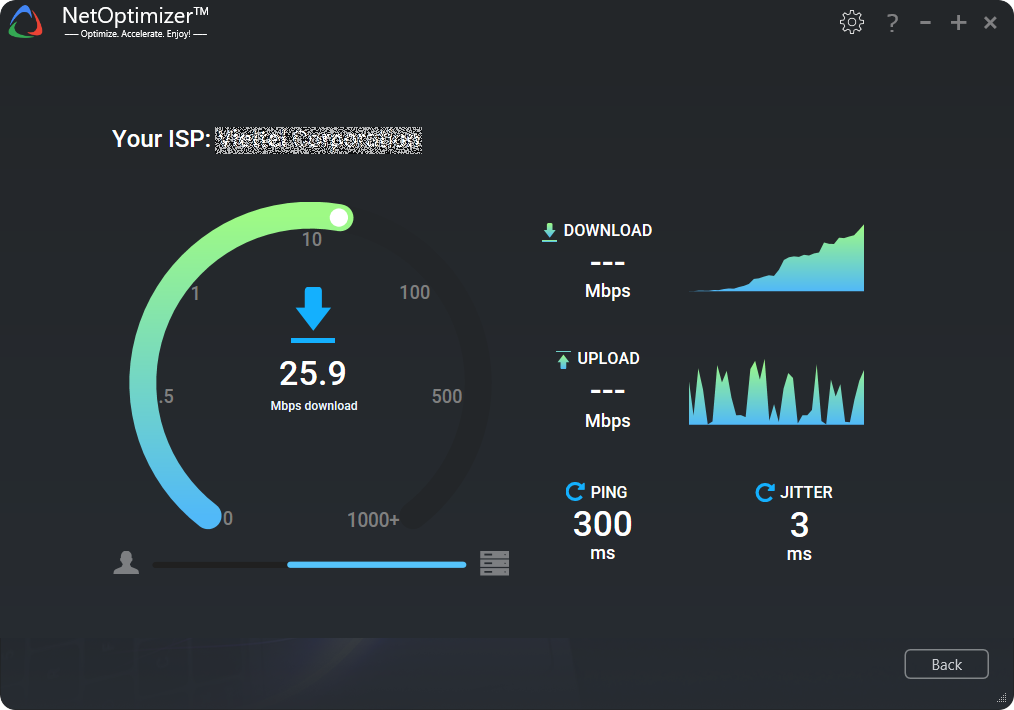
Speed tests use nearby servers, large packets, and optimized conditions. They do not reflect latency sensitivity, routing inefficiencies, packet loss, or application behavior. A perfect speed test does not guarantee fast browsing.
Measuring Meaningful Performance Metrics
Effective diagnosis focuses on latency consistency, packet loss, jitter, and throughput stability over time. Testing under load and at different times of day reveals issues hidden by one-off tests.
A Framework for Real Optimization
True optimization prioritizes stability, low latency, and efficiency. Increasing bandwidth should be a last resort after addressing DNS, routing, Wi-Fi interference, router configuration, and device-level bottlenecks.
Conclusion: Understanding Beats Guesswork
Internet performance problems are solvable when approached systematically. By understanding how the internet actually works, users can fix root causes instead of chasing misleading numbers. With proper optimization, most connections can feel dramatically faster without upgrading service.
Related posts:
 How to Optimize Window 11 for Gaming: Ultimate Tips
 Edge Networks & Content Delivery Networks (CDNs): A Flagship Guide to How the Internet Feels Fast
 Optimizing Internet Performance for Streaming, Video Calls, and Remote Work: A Flagship Guide
 Mobile Internet Optimization: A Flagship Guide to Wi‑Fi, 4G, and 5G Performance
 Security vs Performance: A Flagship Guide to Staying Protected Without Slowing Your Internet
 Troubleshooting Internet Speed Issues: A Flagship Diagnostic Guide from Symptoms to Root Cause